Curliard FFT -For Free Time-[HOME]
Outline
Rule
Operation1
Operation2
CLOSE  × 


Please wait
CLOSE  × 

○Outline○
"Curliard" is a billiards game that incorporates curling rules into billiards.
There is a target circle at the head point of the table, and the score and victory or defeat are determined by the number of balls in the target circle.
It is a billiard game that requires accurate cue ball and target ball control and good use of cushions.

☆Game mode☆
・Single play
It is a mode to challenge the score alone.

・VS CPU play
It is a mode to play against the computer.

・VS human play
It is a mode to play against human. Two humans alternately operate one device.
* It is not a match via the network.
CLOSE  × 
○Rule○
・ At the time of match, the player changes every shot.
・ The cue ball must hit the designated target ball first.
・ The target balls are 1 to 7 for player 1 and 15 to 9 for player 2, and must be hit in order for each shot.
・ If the cue ball is not hit by the target ball, it will be a mistake, the target ball will be removed from the table, and the cue ball will be returned to the position before the shot.
・ If you pocket cue ball, you will be disqualified, your score will be 0, and you will lose in the match.
・ After all shots are completed, the number of target balls in the target circle will be the score, and the one with the higher score will win in the match.
・ If the ball touches the target circle when viewed from above, the ball is considered to be inside the circle.
・ In single play, the score is the number of target balls (1-7) in the target circle minus the number of non-target balls (15-9) in the target circle.
・ The ball layout at the start is as follows.
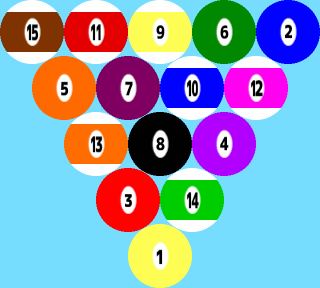
Curliard Start ball layout
CLOSE  × 
○Operation1○
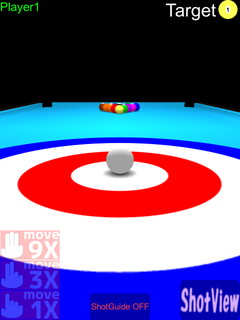
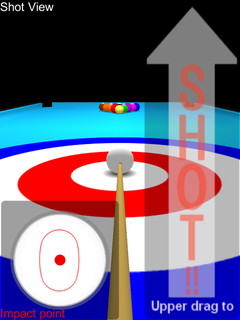
Curliard screen 1 → Curliard screen 2

①When you drag (slide) on screen, a viewpoint will move focusing on a cue ball. The direction of a viewpoint becomes in the direction of a shot.
・ Upward moving range has restriction.
・ If it drags with other button (slide by multi-touch), it can move more greatly. a movement becomes large 3 times with right button(2 fingers) and 9 times with center button(3 fingers).

②If you decided the direction of a shot, please touch the "ShotView" button and shift to ShotView.
 →Operation2
CLOSE  × 
○Operation2○
Curliard screen 2 → Curliard screen3
③You can set impact point by touching ball picture at the bottom left. (* A red frame is guideline of the range of can be set.)
If you dragged(slide) upward on right side of screen, shot start.
* The upward movement of a drag becomes the strength of a shot. A horizontal movement and speed do not influence.

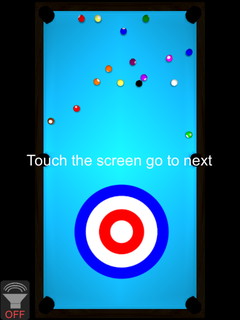
④When shot start, It becomes a viewpoint from a top.
* You can switch on or off the sound effect with the button at the bottom left.

If the display of "Touch the screen go to next", please click (touch) the screen and go to next.